


















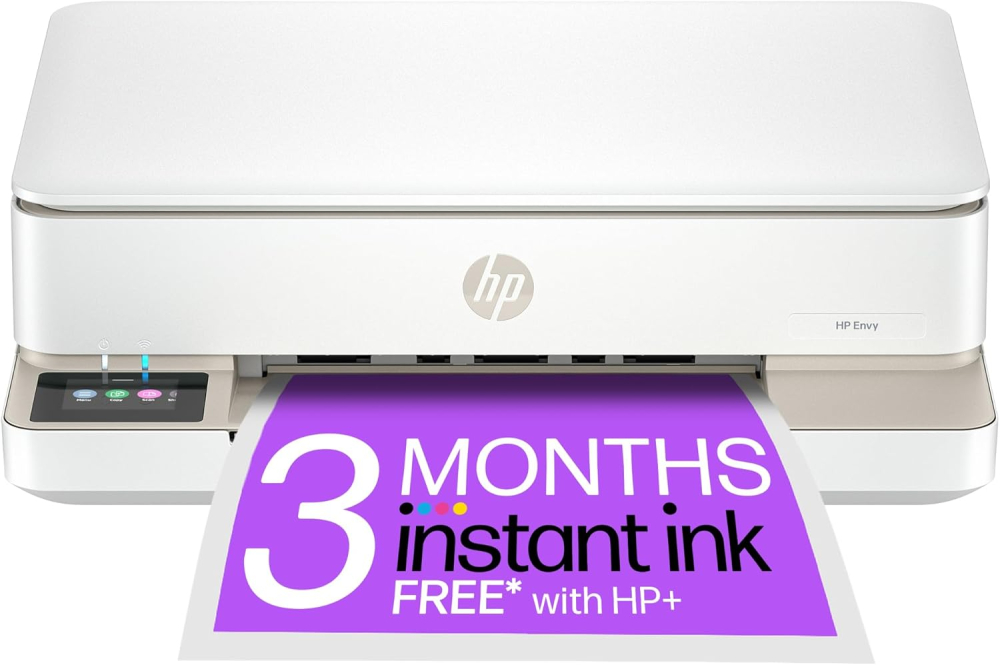
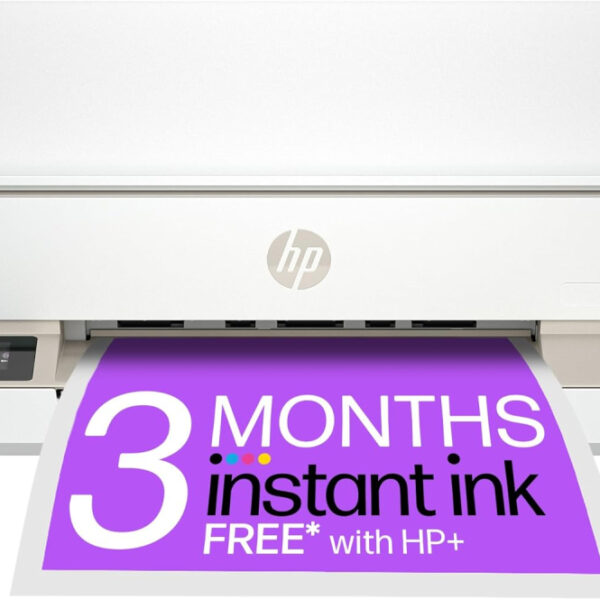
HP Envy 6120e All in One Printer | Perfect for Home | Colour | Wireless | Print, Scan & Copy | 3 Months of free Instant Ink | Easy Setup & Reliable Wi-Fi | White
The HP Envy 6120e All-in-One Wireless Printer is the perfect color printer for home use, offering reliable Wi-Fi, easy setup, and 4-in-1 functions (Print, Scan, Copy). Designed for modern households, this thermal inkjet printer handles documents and photos with professional quality, and includes 3 months of free Instant Ink upon HP+ activation.
- 4-in-1 Versatility (Print, Scan, Copy, Photo) and Automatic Two-Sided Printing.
- Reliable Dual-Band, Self-Healing Wi-Fi for consistent wireless connectivity.
- High-Resolution output (up to 4800 x 1200 DPI color) and fast speeds.
- Includes 3 months of FREE Instant Ink and saves up to 70% on ink refills.
£100.79 Original price was: £100.79.£74.34Current price is: £74.34.
In stock
In stock

Manufacture Warranty

Fast & Secure Shipping

Free 30-Day Returns

Authentic Branded Product




Payment Methods:

Description
HP Envy 6120e All-in-One Wireless Home Printer: Print, Scan, Copy & Auto-Duplex with 3 Months FREE Instant Ink
Boost your home productivity and unlock exceptional quality with the HP Envy 6120e All-in-One Printer. Designed for modern households, this sleek, white, thermal inkjet printer handles all your document and photo needs—printing, scanning, and copying—all in vivid color. Experience seamless connectivity with HP’s dual-band, self-healing Wi-Fi for ultra-reliable wireless performance. Featuring automatic duplex printing (two-sided printing) and a user-friendly 2.4-inch color touchscreen, the Envy 6120e simplifies complex tasks. Activate HP+ during setup to claim 3 months of Instant Ink for free, ensuring you never run out of ink while saving up to 70% on replacements. Perfect for students, remote workers, and families who need easy setup, reliable Wi-Fi, and professional-quality results right at home.
Key Features
- 4-in-1 Versatility: Print, Scan, Copy, and Photo functions in one compact, stylish device.
- Automatic Two-Sided Printing: Save paper and time with built-in auto-duplexing capabilities.
- Reliable Wireless Connectivity: Features HP’s most dependable dual-band, self-healing Wi-Fi for consistent connection.
- High-Resolution Output: Delivers sharp text (up to 1200 x 1200 DPI mono) and stunning color photos (up to 4800 x 1200 DPI color).
- Intuitive Touchscreen: Smoothly navigate settings and jobs using the 2.4-inch color standing screen display.
- Mobile Ready: Effortlessly print, scan, and copy directly from your smartphone or laptop using the HP print app.
- Fast Printing Speeds: Achieve up to 10 ppm (black) and 7 ppm (color).
Important Information
- Includes 3 months of FREE Instant Ink upon HP+ activation during setup (cancel anytime).
- Connectivity options include Wi-Fi and 1 USB 2.0 Port.
- Maximum paper input capacity is 100 sheets (A4 sheet size supported).
- Features a flatbed scanner with 24-bit color depth.
- Compatible with plain paper print media and smartphones.
Why Choose Think Assemble
- Quality Assurance: Every product is verified to meet strict performance and quality standards.
- Fast Shipping: We prioritize rapid processing and delivery to get your new printer working right away.
- Dedicated Support: Our team provides prompt and knowledgeable customer support for hassle-free use.
Specification
Overview
| Weight | 5130 g |
|---|---|
| Dimensions | 3610 × 4330 × 1360 cm |
| Product Dimensions |
36.1D x 43.3W x 13.6H centimetres |
| Maximum Supported Paper Size |
A4 |
| Included components |
HP Envy 6120e All-in-One Printer; Cartridge(s); Cables: AC; HP Printer Software |
| Print media |
Paper (plain) |
| Scanner type |
Flatbed |
| Max input sheet capacity |
100 |
| Max copy speed (black and white) |
8 ppm |
| Compatible devices |
Smartphones |
| Maximum colour print resolution |
4800 x 1200 Dots Per Inch |
| Sheet Size |
210 x 297 Millimetres |
| Maximum black and white print resolution |
1200 x 1200 Dots Per Inch |
| Warranty type |
limited warranty |
| Colour depth |
24 Bits |
| Dual-sided printing |
Yes |
| Maximum copies per run |
99 |
| Item model number |
714L8B#687 |
| Manufacturer |
HP |
| Form factor |
All-in-One |
| Standing screen display size |
2.4 Inches |
| Connectivity Type |
Wi-Fi |
| Number of USB 2.0 Ports |
1 |
| Are Batteries Included |
No |
| Item weight |
5.13 kg |
| Guaranteed software updates until |
unknown |
| Date First Available |
5 Aug. 2024 |
Customer Reviews
16 reviews for HP Envy 6120e All in One Printer | Perfect for Home | Colour | Wireless | Print, Scan & Copy | 3 Months of free Instant Ink | Easy Setup & Reliable Wi-Fi | White
Clear filtersOnly logged in customers who have purchased this product may leave a review.
Related Products
In stock

In stock
In stock
In stock
HK –
This printer , scanner and copier is nice and compact in size, purchased it to replace my brother psc as the scanning function stopped working on it. Installation was more difficult than on other occasions when I have bought a printer. After installing I tried to scan a document but got a message saying you need to download the scanning software. This had to be done after the original installation . I found this a bit strange. Print , copy and scan quality is good . Has a nice slim paper tray that slides very easily, a blue light that shows that you are connected to WiFi ( if it flashes it means you are not ) and a very neat multifunctional display that is easy to use. Has the on and off switch on the back of the printer, light indicator at front showing it is on. Overall would recommendthe printer as it is good value for money.
HH –
An excellent printer. Purchased to replace old HP 4630 but no longer need document feed. Very easy to install, despite negative comments in some reviews. Connected to wi fi within seconds. Easy load inks (good deal with free ink). Simple paper tray. Copy quality is good in both black and colour. Double sided print as good as 4630 but a little slower. Very satisfied with this purchase and HP.
Ali Dave –
Really pleased with this printer.EDIT AFTER ORIGINAL REVIEW BELOW…All the below is still correct, however here’s a few issues I’ve discovered since owning the printer for a while. If you don’t have the printer on continually HP nag you to turn it on. Mine is in my bedroom and the lights are quite bright. I need to check if there’s a way of turning the lights off. They assure you it uses minimal electric to keep it on but I do find it wasteful to keep it on constantly. Also I’ve found printing through the app quite fiddly sometimes and sometimes a bit of a lag on recognising the printer. It also disconnected itself from WiFi once and I struggled to navigate the app to find out how to reconnect. I have up in the end and got someone more IT savvy to do it. Had one of two paper jams but usually when it gets to the last few pieces of paper in the tray. Very easy to clear by opening the paper tray and tilting up the printer to access underneath. Not sure if that’s the correct way but works for me. I still think it’s a good bit and good value for money and definitely recommend putting your free ink refer a friend code in your amazon review to get a few extra months………………………………………………Install was easy…downloaded the HP app and followed the instructions step by step. Once the printer is set up, set up the free 6 month ink trial by entering your shipping and billing details. At this point I also added a refer a friend code giving me another 1 months free. I’ve got a code p3nznv if you want to use this. Also code FREEINK gives you another 1 month free, so 8 months in total and you can print up to 700 pages a month during your free trial. The printer also comes with 1 colour and 1 black cartridge. The free ink is sent in about 10 days. I’ve added a photo of the booklet that came with the printer explaining the plan. Lots of free printables on the HP app such as kids activities, colouring, planners, calendars, etc. Really like the design of the printer too and the fact that the paper is stored away in a tray at the bottom not flapping around and collecting dust in a top feeder. My only slight bug bear is that the power lead is at the back and protrudes a bit so it can’t be pushed flat against the wall but it really isn’t a big deal and looks great regardless. Well happy.
Speech –
I bought this printer to replace my Canon Pixma and I’m very happy with it. It doesn’t take up much space and looks good too.The setup was easy. I was sceptical about this having read the reviews but I had no issues whatsoever. You just follow the step by step guide in the HP Smart app. It asks you to press a couple of buttons during the process and conveniently these flash for you to indicate which button to press.The power cord is a little bit on the short side. It measures 140 cms from plug to connector, not allowing for any flex. Depending upon where your plug is located you may need to buy a slightly longer one.The print quality is great and the scan/copy function works very well and is really useful. It’s far better than my old printer. This was 5 years old though, so I suspect technology has improved in that time.Printing/scanning from my phone works a treat and is handy. It seems to have a fair few other features as well that I’m unlikely to use, so can’t really comment on these.It is possible to use non-HP cartridges – I think. If you wish to do this you mustn’t enable HP+ during the app setup. When you accept this free service a code is sent to the printer which locks it to genuine HP cartridges only. You don’t have to opt into this though if you don’t want to. I think by not agreeing to this you will lose some/all of the smart functionality, which kind of defeats the object.Genuine HP cartridges are circa £18 for a twin pack which is cheaper than I previously paid.I opted to sign up for the instant ink service as I thought it was reasonable at circa £5 per month. They take away the hassle of ever running out of ink and it covers shipping/recycling too. You get 3 months free out of the box and if you use the code ‘nfhzgw’ during setup you get another month free.You can also cancel the instant ink service at anytime or change the plan, which is good. I’m going to give it a try given it’s free for 4 months and decide whether to stick with, or not, then.Overall it’s a great little printer that does everything you’d expect. Very pleased with the purchase.Update: After a couple of months use it’s still working great, no issues whatsoever with connectivity and print quality. The ink has been delivered in a timely fashion too.Within the HP Smart App there is a section called ‘Printables’ which is really useful. Maybe not to all but certainly to some. You can download templates for Wall Planners, Calendars, Kids activities, Cards, Crafts etc. All free. You just pick the template you want and then tap print from your phone.The photocopy option is also proving to be very useful and is a great feature.Update 2: Having used the printer for nearly 12 months now it is still fantastic. I’ve had no issues with it whatsoever and using it frequently.Update 3: Still working perfectly and no issues to report.
guideanna –
Ink package not working
Coulnt’ get the printer to connect tot he app to register for the ink package that came as part of the purchase so i feel this was a bit of a swizz! Printer works fine tho.
Maria Scuderi –
E’ perfetta
Finalmente ho trovato la stampante che fa per me. Collegata a più dispositivi tramite wi-fi , c’è anche lo scanner integrato. E’ perfetta per ciò che devo fare.
nadia –
Ottima
Buona stampante per piccoli spazi, un po’ scomoda per l’accensione sul retro della stampante
Bruno Benve –
Molto compatta, spazio sfruttato bene.
La stampante funziona perfettamente.Il cassetto di alimentazione dei fogli è posizionato sotto il dispositivo e riduce notevolmente lo spazio occupato.Molto utile la stampa fronte/retro automatica.
HK –
This printer , scanner and copier is nice and compact in size, purchased it to replace my brother psc as the scanning function stopped working on it. Installation was more difficult than on other occasions when I have bought a printer. After installing I tried to scan a document but got a message saying you need to download the scanning software. This had to be done after the original installation . I found this a bit strange. Print , copy and scan quality is good . Has a nice slim paper tray that slides very easily, a blue light that shows that you are connected to WiFi ( if it flashes it means you are not ) and a very neat multifunctional display that is easy to use. Has the on and off switch on the back of the printer, light indicator at front showing it is on. Overall would recommendthe printer as it is good value for money.
HH –
An excellent printer. Purchased to replace old HP 4630 but no longer need document feed. Very easy to install, despite negative comments in some reviews. Connected to wi fi within seconds. Easy load inks (good deal with free ink). Simple paper tray. Copy quality is good in both black and colour. Double sided print as good as 4630 but a little slower. Very satisfied with this purchase and HP.
Ali Dave –
Really pleased with this printer.EDIT AFTER ORIGINAL REVIEW BELOW…All the below is still correct, however here’s a few issues I’ve discovered since owning the printer for a while. If you don’t have the printer on continually HP nag you to turn it on. Mine is in my bedroom and the lights are quite bright. I need to check if there’s a way of turning the lights off. They assure you it uses minimal electric to keep it on but I do find it wasteful to keep it on constantly. Also I’ve found printing through the app quite fiddly sometimes and sometimes a bit of a lag on recognising the printer. It also disconnected itself from WiFi once and I struggled to navigate the app to find out how to reconnect. I have up in the end and got someone more IT savvy to do it. Had one of two paper jams but usually when it gets to the last few pieces of paper in the tray. Very easy to clear by opening the paper tray and tilting up the printer to access underneath. Not sure if that’s the correct way but works for me. I still think it’s a good bit and good value for money and definitely recommend putting your free ink refer a friend code in your amazon review to get a few extra months………………………………………………Install was easy…downloaded the HP app and followed the instructions step by step. Once the printer is set up, set up the free 6 month ink trial by entering your shipping and billing details. At this point I also added a refer a friend code giving me another 1 months free. I’ve got a code p3nznv if you want to use this. Also code FREEINK gives you another 1 month free, so 8 months in total and you can print up to 700 pages a month during your free trial. The printer also comes with 1 colour and 1 black cartridge. The free ink is sent in about 10 days. I’ve added a photo of the booklet that came with the printer explaining the plan. Lots of free printables on the HP app such as kids activities, colouring, planners, calendars, etc. Really like the design of the printer too and the fact that the paper is stored away in a tray at the bottom not flapping around and collecting dust in a top feeder. My only slight bug bear is that the power lead is at the back and protrudes a bit so it can’t be pushed flat against the wall but it really isn’t a big deal and looks great regardless. Well happy.
Speech –
I bought this printer to replace my Canon Pixma and I’m very happy with it. It doesn’t take up much space and looks good too.The setup was easy. I was sceptical about this having read the reviews but I had no issues whatsoever. You just follow the step by step guide in the HP Smart app. It asks you to press a couple of buttons during the process and conveniently these flash for you to indicate which button to press.The power cord is a little bit on the short side. It measures 140 cms from plug to connector, not allowing for any flex. Depending upon where your plug is located you may need to buy a slightly longer one.The print quality is great and the scan/copy function works very well and is really useful. It’s far better than my old printer. This was 5 years old though, so I suspect technology has improved in that time.Printing/scanning from my phone works a treat and is handy. It seems to have a fair few other features as well that I’m unlikely to use, so can’t really comment on these.It is possible to use non-HP cartridges – I think. If you wish to do this you mustn’t enable HP+ during the app setup. When you accept this free service a code is sent to the printer which locks it to genuine HP cartridges only. You don’t have to opt into this though if you don’t want to. I think by not agreeing to this you will lose some/all of the smart functionality, which kind of defeats the object.Genuine HP cartridges are circa £18 for a twin pack which is cheaper than I previously paid.I opted to sign up for the instant ink service as I thought it was reasonable at circa £5 per month. They take away the hassle of ever running out of ink and it covers shipping/recycling too. You get 3 months free out of the box and if you use the code ‘nfhzgw’ during setup you get another month free.You can also cancel the instant ink service at anytime or change the plan, which is good. I’m going to give it a try given it’s free for 4 months and decide whether to stick with, or not, then.Overall it’s a great little printer that does everything you’d expect. Very pleased with the purchase.Update: After a couple of months use it’s still working great, no issues whatsoever with connectivity and print quality. The ink has been delivered in a timely fashion too.Within the HP Smart App there is a section called ‘Printables’ which is really useful. Maybe not to all but certainly to some. You can download templates for Wall Planners, Calendars, Kids activities, Cards, Crafts etc. All free. You just pick the template you want and then tap print from your phone.The photocopy option is also proving to be very useful and is a great feature.Update 2: Having used the printer for nearly 12 months now it is still fantastic. I’ve had no issues with it whatsoever and using it frequently.Update 3: Still working perfectly and no issues to report.
guideanna –
Ink package not working
Coulnt’ get the printer to connect tot he app to register for the ink package that came as part of the purchase so i feel this was a bit of a swizz! Printer works fine tho.
Maria Scuderi –
E’ perfetta
Finalmente ho trovato la stampante che fa per me. Collegata a più dispositivi tramite wi-fi , c’è anche lo scanner integrato. E’ perfetta per ciò che devo fare.
nadia –
Ottima
Buona stampante per piccoli spazi, un po’ scomoda per l’accensione sul retro della stampante
Bruno Benve –
Molto compatta, spazio sfruttato bene.
La stampante funziona perfettamente.Il cassetto di alimentazione dei fogli è posizionato sotto il dispositivo e riduce notevolmente lo spazio occupato.Molto utile la stampa fronte/retro automatica.