



















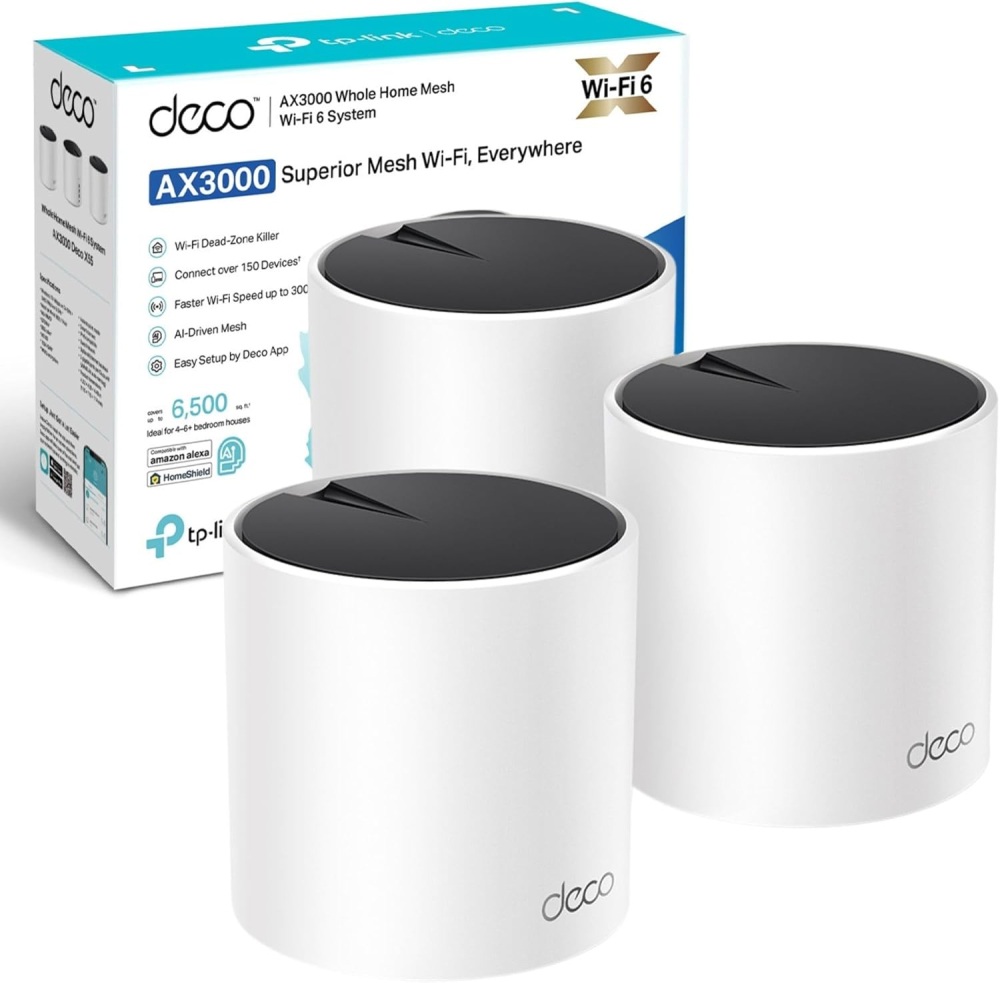
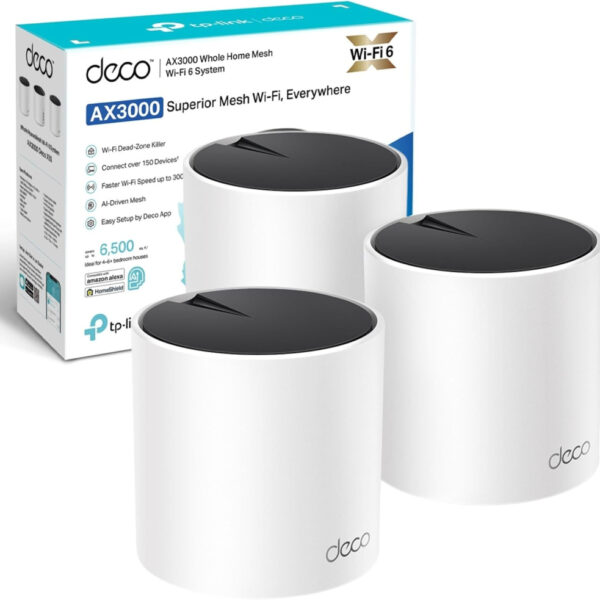
TP-Link Deco X55(3-pack) AX3000Mbps AI-Driven Whole Home Mesh WiFi 6 System, 3x Gigabit Ports, WiFi Booster Coverage up to 6,500 ft2, Connect up to 150 devices, HomeShield Security
Short Product Overview
The TP-Link Deco X55 (3-pack) is an AI-Driven Whole Home Mesh WiFi 6 System engineered to eliminate dead zones, delivering ultra-fast AX3000 speeds up to 3.0 Gbps across a vast 6,500 sq. ft. area. Effortlessly connect over 150 devices with a stable, customized connection while benefiting from advanced TP-Link HomeShield security for complete network protection.
- Blazing fast AX3000 Dual-Band WiFi 6 speeds (up to 3.0 Gbps).
- Superior Mesh WiFi coverage up to 6,500 sq. ft. to eliminate dead zones.
- Connect 150+ devices and enjoy lag-free performance thanks to high-efficiency AI-Driven Mesh Technology.
- Features 3 Gigabit Ethernet ports per unit for high-speed wired connections and robust HomeShield Security.
£294.85 Original price was: £294.85.£226.79Current price is: £226.79.
In stock
In stock

Manufacture Warranty

Fast & Secure Shipping

Free 30-Day Returns

Authentic Branded Product




Payment Methods:

Description
TP-Link Deco X55 AX3000 (3-Pack): Ultra-Fast AI-Driven Whole Home Mesh WiFi 6 System for Seamless Coverage
Upgrade to the ultimate internet experience with the TP-Link Deco X55 Mesh WiFi 6 System. This powerful 3-pack is engineered to eliminate dead zones, delivering incredible AX3000 speeds up to 3.0 Gbps across a massive 6,500 sq. ft. area. Driven by cutting-edge AI technology, the Deco X55 intelligently learns your home environment to provide a perfectly customized and lightning-fast connection, ensuring every device—from 4K TVs to smart security systems—runs flawlessly. With the capacity to effortlessly connect over 150 devices and featuring three Gigabit ports per unit for high-speed wired connections, the Deco X55 is the future-proof solution for demanding smart homes. Experience next-level security with TP-Link HomeShield, offering real-time IoT protection, robust parental controls, and comprehensive network security—all managed easily through a simple app.
Key Features
- Blazing Fast WiFi 6 Speeds: Dual-band AX3000 delivers combined speeds up to 3.0 Gbps (2402 Mbps on 5 GHz + 574 Mbps on 2.4 GHz).
- Superior Whole Home Coverage: Achieve seamless, ultra-reliable Mesh WiFi coverage up to 6,500 sq. ft. (3-pack).
- Connect 150+ Devices: High-efficiency WiFi 6 handles massive bandwidth demands, supporting over 150 connected devices without lag.
- AI-Driven Mesh Technology: Intelligently optimizes the network to provide a stable, unique, and ideal Wi-Fi signal specific to your home layout.
- Enhanced Wired Connectivity: Each Deco unit includes 3 Gigabit Ethernet ports for maximizing performance on computers, game consoles, and smart hubs.
- TP-Link HomeShield Security: Includes comprehensive network protection, professional parental controls, and real-time IoT defense.
Important Information
- Wireless Standard: 802.11ax (Wi-Fi 6) Dual-Band.
- Deco X55 3-pack includes 3 main units, power adapters, and an Ethernet cable.
- Quick and easy setup via the dedicated TP-Link Deco app.
- Compatible with all other Deco models to form one large mesh network.
- Requires a working internet service provider (ISP) connection.
Why Choose Think Assemble
- Trusted Quality Assurance: Every product is rigorously tested to ensure peak performance and reliability right out of the box.
- Dedicated UK Support: Our expert team is ready to assist you with setup and troubleshooting for a hassle-free experience.
- Fast, Secure Shipping: We prioritize rapid dispatch and secure packaging to get your powerful Mesh WiFi system to your door quickly.
Specification
Overview
| Weight | 1.2 g |
|---|---|
| Dimensions | 11 × 11 × 11.4 cm |
| Brand | |
| Product Dimensions |
11 x 11 x 11.4 cm; 1.2 g |
| Item model number |
Deco X55(3-pack) |
| Manufacturer |
TP Link |
| Series |
Deco X55(3-pack) |
| Colour |
White |
| Wireless Type |
802.11ax |
| Operating System |
Linux |
| Are Batteries Included |
No |
| Item weight |
1.2 g |
| Guaranteed software updates until |
unknown |
| Date First Available |
2 Aug. 2022 |
Customer Reviews
20 reviews for TP-Link Deco X55(3-pack) AX3000Mbps AI-Driven Whole Home Mesh WiFi 6 System, 3x Gigabit Ports, WiFi Booster Coverage up to 6,500 ft2, Connect up to 150 devices, HomeShield Security
Clear filtersOnly logged in customers who have purchased this product may leave a review.
Related Products
In stock

In stock
In stock
In stock
Jamie D. –
I’ve tried a few Wi‑Fi setups over the years — from a single router to old extenders — and struggled with rooms where the signal was weak or just didn’t reach. The TP-Link Deco X55 (3‑pack) mesh WiFi system has, quite frankly, solved those problems — it’s robust, fast, and has transformed internet coverage across my whole home.I first got the 3‑pack because we have multiple devices — phones, laptops, tablets, smart‑home gadgets — and needed coverage across different floors and rooms. Setting it up was surprisingly simple, even for someone not particularly tech‑savvy: plug in the main unit, use the Deco app to follow the prompts, and before I knew it the mesh network was live.The coverage is impressive — rooms that previously had weak or patchy signal are now solid and stable. Whether upstairs, in the kitchen, or tucked away in a corner room, I get strong, consistent Wi‑Fi. Even outdoors on the patio I noticed a usable signal, which has been great for music and streaming devices.Performance has been top‑notch. Streaming videos, video calls, gaming, working from home — everything feels smooth, with minimal buffering or connection drops. The WiFi 6 boost makes a difference, especially when multiple devices are connected: there’s no noticeable slowdown even during peak usage.I also like the extras: the three gigabit ports on each unit give flexibility if I want to connect wired devices, and the system’s ability to handle up to ~150 devices gives plenty of breathing room for current and future gadgets. The built‑in HomeShield security gives extra peace of mind, which feels important with so many smart devices around.Overall, the TP-Link Deco X55 (3‑pack) has been a real upgrade — it turned our home network from a weak, patchy system into a stable, high‑speed mesh that covers the entire house. For anyone struggling with poor Wi‑Fi range or juggling many devices at once, this mesh system is a strong recommendation.
Brett –
Hi there,I thought i would write this review because it took me a lot of time and research to resolve my connection issues with my RING devices, and I have now finally fixed the issues.I have been having connectivity issues with my Ring devices for months now and decided I needed to take action on fixing this issue. I first factory reset my main ISP router and intelligent pods and set all back up (checking WIFI channels for congestion and pods for signal, there was no signal coming off the pods or Ring pro chime WIFI extender) still the exactly same issues.I then bought a mesh tp-link router with 4 antennas and a tp-link mesh WIFI extender with 2 antennas, so putting my main ISP router in to modem mode and connecting my new tp-link mesh router to the existing ISP router, the Ring devices was still struggling with WIFI connection, I live in a 3 bedroom house and set the equipment up perfectly, the speeds however was excellent in every part of my house after installing the new tp-link mesh router and tp-link mesh extender from average 80 mbps to 250 mbps in the worst signal areas of my property, but the RING devices was still struggling.I decided to bite the bullet and go with the tp-link WIFI 6 deco Mesh system and I have now fixed the connection issues with my RING devices, full signal bars on both RING devices and all other devices in the house and 250mbps in every room in the house, the MESH system was very easy to set up via the tp-link deco app, i did have a issue when I first set the MESH system up because the connectivity to the RING devices was set to auto from 2.4GHz to 5GHz and was connecting to 5GHz automatically and the RING devices work better on 2.4GHz so I went in to the RING devices on the Deco app and changed from auto to 2.4GHz and this solved the issue and now works perfect, the deco app is brilliant and you can customise your deco system like renaming your devices and you can see the signal strength of each device including the deco units, please don’t worry when you see your connected devices offline as the AI deco will connect automatically when needed to stop congestion.Please be aware when buying the deco systems and always go above what internet speed you have, so I have 250 mbps internet so I only required 300 mbps max capability deco system but went for the one up model to future proof if I ever needed more then 250mbps internet, it’s also worth getting WIFI 6 deco like mine for WIFI 6 devices.I am very happy with the tp-link WIFI 6 deco Mesh system, I know it’s not the cheapest option but in my case it was the only option and I am glad a bought it.I hope this review helps you solve your internet issues and saves you some precious time.
Daren –
Tp Link Deco X55 have reduced the wifi dead spots in our home with fantastic speed delivery, hard wired the main house with cat6 for the maximum speeds with 5 units in place and 1 linked on wifi. Turned off hub wifi so the deco units can create a mesh wifi to supply all smart sockets and light switches plus D235 smart door bell, smart TV’s and the Alexa’s. Quality product, fantastic signal strength, A very reliable product.
John –
The X55 certainly eliminates dead spots but you can expect a large drop in speeds away from the main unit, that isn’t to say it drops right off to nothing, speeds still remain fast and usable but in my case around half of the speeds from the main unit regardless of where i place the other mesh pods.One thing to remember is the gigabit ports will limit your speeds if you have internet above 1Gbit, you’ll need a system with 2.5 gigabit ports for higher speeds.Set was relatively easy but required multiple attempts to get up and running and the app software is on the poor side. Once it’s all up and running though it’s all trouble free.
Simon R Jones –
I had been using Draytek mesh but found it was a little clunky and generated blind areas making it hard to move from one zone to another.These were simple to set up, provide good coverage and seem good in a light industrial environment.The wifi quality and signal seem good so far, they are also easy to update. with respect to price, a three pack of these for less than the cost of two draytek units.
MUSTAFA –
Wifi kapsama alanı sorununa kesin çözüm sağlayan bir ürün
Evimiz 240 m2 olduğu için ve doğal olarak betonarme perde beton duvarlar vb olduğu için modemin kendi wifi kapasitesi evin tamamını kapsamaya yetmiyordu. Elimdeki eski modem-router’lar ile diğer odalarda kapsama alanı oluşturdum ama oda geçişlerinde diğer cihaza geçiş vb. çok efektif olmuyordu. Sonrasında TP-Link Deco M4 2-pack AC1200 mesh cihazını aldım evin içinde uygun alanlara yerleştirdim. Artık wifi kapsama alanı sorunu yaşamıyoruz evin içinde. Güzel ürün. Wifi kapsama alanı sorunu yaşayanlara tavsiye ederim.
JJCK –
Très bon produit, toutefois trop cher.
Très bon produit, toutefois trop cher.Bonne application, installation facile.Dans ma maison j’ai de 800 mégas à 1 giga de wifi en moyenne.Petit conseil laissez le wifi de la box pour les invités et créez un nouveau réseau personnel et puissant à votre usage. Contrairement aux idées reçues adsl ou fibre n’ont pas de meilleur wifi, d’où l’intérêt de ce type d’appareil.
joy –
słaby zasięg
Nie jest źle ale spodziewałem się lepszego pokrycia powierzchni . Nie warty swojej ceny. Nie wiem skąd tyle pochlebnych opinii . Nie polecam.
Demschik Gerald Dr –
Bestens
Mit 4 Stk Deco X50 4 große Ebenen mit Stahlbetondecken sehr gut abgedeckt. Einfache Installation auch für Laien wie angegeben, funktionelle App. Telekom liefert 100 MBit/s, über Ethernet Backhaul (einfach anstecken und wird erkannt, habe ich überall 90-95 MBit/s.
Eduardo Molina Lara –
Desempeño
Tiene un buen desempeño, desde que lo instale el internet ya no se corta o interrumpe. Excelente realmente lo recomiendo.
Jamie D. –
I’ve tried a few Wi‑Fi setups over the years — from a single router to old extenders — and struggled with rooms where the signal was weak or just didn’t reach. The TP-Link Deco X55 (3‑pack) mesh WiFi system has, quite frankly, solved those problems — it’s robust, fast, and has transformed internet coverage across my whole home.I first got the 3‑pack because we have multiple devices — phones, laptops, tablets, smart‑home gadgets — and needed coverage across different floors and rooms. Setting it up was surprisingly simple, even for someone not particularly tech‑savvy: plug in the main unit, use the Deco app to follow the prompts, and before I knew it the mesh network was live.The coverage is impressive — rooms that previously had weak or patchy signal are now solid and stable. Whether upstairs, in the kitchen, or tucked away in a corner room, I get strong, consistent Wi‑Fi. Even outdoors on the patio I noticed a usable signal, which has been great for music and streaming devices.Performance has been top‑notch. Streaming videos, video calls, gaming, working from home — everything feels smooth, with minimal buffering or connection drops. The WiFi 6 boost makes a difference, especially when multiple devices are connected: there’s no noticeable slowdown even during peak usage.I also like the extras: the three gigabit ports on each unit give flexibility if I want to connect wired devices, and the system’s ability to handle up to ~150 devices gives plenty of breathing room for current and future gadgets. The built‑in HomeShield security gives extra peace of mind, which feels important with so many smart devices around.Overall, the TP-Link Deco X55 (3‑pack) has been a real upgrade — it turned our home network from a weak, patchy system into a stable, high‑speed mesh that covers the entire house. For anyone struggling with poor Wi‑Fi range or juggling many devices at once, this mesh system is a strong recommendation.
Brett –
Hi there,I thought i would write this review because it took me a lot of time and research to resolve my connection issues with my RING devices, and I have now finally fixed the issues.I have been having connectivity issues with my Ring devices for months now and decided I needed to take action on fixing this issue. I first factory reset my main ISP router and intelligent pods and set all back up (checking WIFI channels for congestion and pods for signal, there was no signal coming off the pods or Ring pro chime WIFI extender) still the exactly same issues.I then bought a mesh tp-link router with 4 antennas and a tp-link mesh WIFI extender with 2 antennas, so putting my main ISP router in to modem mode and connecting my new tp-link mesh router to the existing ISP router, the Ring devices was still struggling with WIFI connection, I live in a 3 bedroom house and set the equipment up perfectly, the speeds however was excellent in every part of my house after installing the new tp-link mesh router and tp-link mesh extender from average 80 mbps to 250 mbps in the worst signal areas of my property, but the RING devices was still struggling.I decided to bite the bullet and go with the tp-link WIFI 6 deco Mesh system and I have now fixed the connection issues with my RING devices, full signal bars on both RING devices and all other devices in the house and 250mbps in every room in the house, the MESH system was very easy to set up via the tp-link deco app, i did have a issue when I first set the MESH system up because the connectivity to the RING devices was set to auto from 2.4GHz to 5GHz and was connecting to 5GHz automatically and the RING devices work better on 2.4GHz so I went in to the RING devices on the Deco app and changed from auto to 2.4GHz and this solved the issue and now works perfect, the deco app is brilliant and you can customise your deco system like renaming your devices and you can see the signal strength of each device including the deco units, please don’t worry when you see your connected devices offline as the AI deco will connect automatically when needed to stop congestion.Please be aware when buying the deco systems and always go above what internet speed you have, so I have 250 mbps internet so I only required 300 mbps max capability deco system but went for the one up model to future proof if I ever needed more then 250mbps internet, it’s also worth getting WIFI 6 deco like mine for WIFI 6 devices.I am very happy with the tp-link WIFI 6 deco Mesh system, I know it’s not the cheapest option but in my case it was the only option and I am glad a bought it.I hope this review helps you solve your internet issues and saves you some precious time.
Daren –
Tp Link Deco X55 have reduced the wifi dead spots in our home with fantastic speed delivery, hard wired the main house with cat6 for the maximum speeds with 5 units in place and 1 linked on wifi. Turned off hub wifi so the deco units can create a mesh wifi to supply all smart sockets and light switches plus D235 smart door bell, smart TV’s and the Alexa’s. Quality product, fantastic signal strength, A very reliable product.
John –
The X55 certainly eliminates dead spots but you can expect a large drop in speeds away from the main unit, that isn’t to say it drops right off to nothing, speeds still remain fast and usable but in my case around half of the speeds from the main unit regardless of where i place the other mesh pods.One thing to remember is the gigabit ports will limit your speeds if you have internet above 1Gbit, you’ll need a system with 2.5 gigabit ports for higher speeds.Set was relatively easy but required multiple attempts to get up and running and the app software is on the poor side. Once it’s all up and running though it’s all trouble free.
Simon R Jones –
I had been using Draytek mesh but found it was a little clunky and generated blind areas making it hard to move from one zone to another.These were simple to set up, provide good coverage and seem good in a light industrial environment.The wifi quality and signal seem good so far, they are also easy to update. with respect to price, a three pack of these for less than the cost of two draytek units.
MUSTAFA –
Wifi kapsama alanı sorununa kesin çözüm sağlayan bir ürün
Evimiz 240 m2 olduğu için ve doğal olarak betonarme perde beton duvarlar vb olduğu için modemin kendi wifi kapasitesi evin tamamını kapsamaya yetmiyordu. Elimdeki eski modem-router’lar ile diğer odalarda kapsama alanı oluşturdum ama oda geçişlerinde diğer cihaza geçiş vb. çok efektif olmuyordu. Sonrasında TP-Link Deco M4 2-pack AC1200 mesh cihazını aldım evin içinde uygun alanlara yerleştirdim. Artık wifi kapsama alanı sorunu yaşamıyoruz evin içinde. Güzel ürün. Wifi kapsama alanı sorunu yaşayanlara tavsiye ederim.
JJCK –
Très bon produit, toutefois trop cher.
Très bon produit, toutefois trop cher.Bonne application, installation facile.Dans ma maison j’ai de 800 mégas à 1 giga de wifi en moyenne.Petit conseil laissez le wifi de la box pour les invités et créez un nouveau réseau personnel et puissant à votre usage. Contrairement aux idées reçues adsl ou fibre n’ont pas de meilleur wifi, d’où l’intérêt de ce type d’appareil.
joy –
słaby zasięg
Nie jest źle ale spodziewałem się lepszego pokrycia powierzchni . Nie warty swojej ceny. Nie wiem skąd tyle pochlebnych opinii . Nie polecam.
Demschik Gerald Dr –
Bestens
Mit 4 Stk Deco X50 4 große Ebenen mit Stahlbetondecken sehr gut abgedeckt. Einfache Installation auch für Laien wie angegeben, funktionelle App. Telekom liefert 100 MBit/s, über Ethernet Backhaul (einfach anstecken und wird erkannt, habe ich überall 90-95 MBit/s.
Eduardo Molina Lara –
Desempeño
Tiene un buen desempeño, desde que lo instale el internet ya no se corta o interrumpe. Excelente realmente lo recomiendo.