




















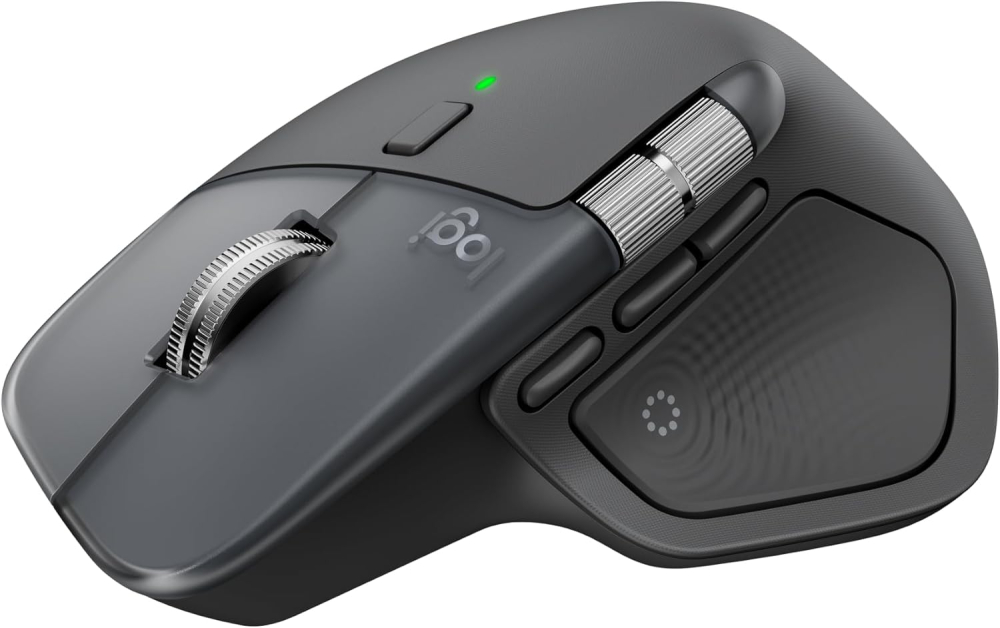
Logitech MX Master 4, Ergonomic Wireless Mouse with Advanced Performance Haptic Feedback, Ultra-Fast Scrolling, USB-C Charging, Bluetooth, Windows, MacOS – Graphite
Short Product Overview
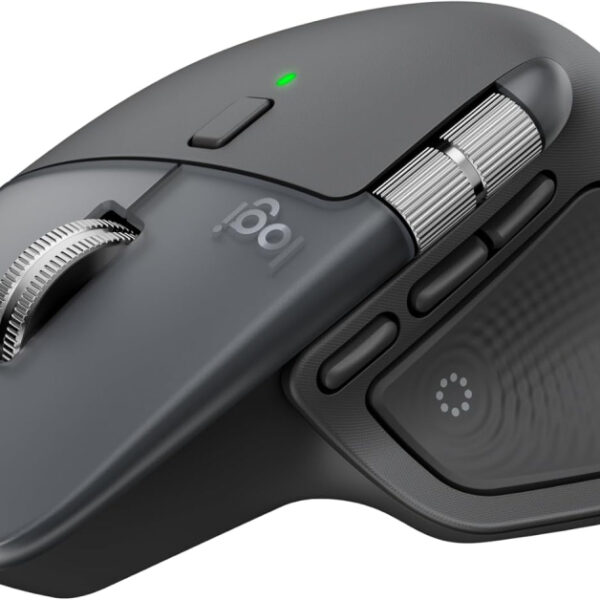
The Logitech MX Master 4 is the ultimate ergonomic wireless mouse for professionals, engineered with advanced Haptic Feedback and a sculpted design for superior comfort and precision on Windows and macOS. Dominate your workflow with Ultra-Fast MagSpeed scrolling (1,000 lines/second), versatile Bluetooth and USB-C connectivity, and long-lasting USB-C charging.
- Ergonomic design with Haptic Feedback for enhanced control and reduced hand stress.
- MagSpeed Scroll Wheel offers ultra-fast and precise scrolling up to 1,000 lines per second.
- Features Dual Connectivity (Bluetooth/USB-C dongle) and seamless USB-C charging.
- Quiet Click technology ensures a focused, distraction-free work environment.
£151.19
In stock
In stock

Manufacture Warranty

Fast & Secure Shipping

Free 30-Day Returns

Authentic Branded Product




Payment Methods:

Description
Logitech MX Master 4: The Ultimate Ergonomic Wireless Mouse for High-Performance Professionals (Graphite)
Upgrade your workflow with the Logitech MX Master 4, the definitive ergonomic wireless mouse engineered for precision, speed, and comfort on Windows and macOS. Featuring cutting-edge Haptic Feedback, this performance mouse allows you to feel specific actions, dramatically enhancing productivity and control. Dominate spreadsheets and creative projects with the revolutionary MagSpeed scroll wheel, which boasts Ultra-Fast Scrolling, flying through 1,000 lines per second while maintaining pixel-perfect stopping power. Designed for power users, the MX Master 4 offers seamless USB-C Charging and versatile connectivity via Bluetooth or a strong USB-C dongle. Its sculpted, comfortable design reduces hand stress, and Quiet Clicks ensure a focused, distraction-free environment. Invest in the MX Master 4 and experience the next level of professional computer navigation.
Key Features
- Haptic Sense Panel delivers customizable haptic feedback for enhanced precision and control in your applications.
- MagSpeed Electromagnetic Scroll Wheel provides Logitech’s fastest, quietest, and most precise scrolling experience (1,000 lines per second).
- Actions Ring (a dynamic, customizable overlay) allows effortless access to favorite tools and shortcuts tailored to each application.
- Ergonomic design with a natural tilt and intuitive thumb wheel reduces stress and maximizes comfort during long work sessions.
- Dual Connectivity: Connect instantly via energy-efficient Bluetooth or the advanced USB-C dongle for a 2X stronger, faster, and more reliable connection.
- Quiet Click technology reduces click noise by 90%, creating a better focused workspace.
- Built with sustainability in mind, featuring recycled plastic content (up to 54% in Graphite) and 100% recycled cobalt in the battery.
Important Information
- Colour: Graphite
- Connectivity: Bluetooth, Wireless (USB-C Dongle)
- Movement Detection Technology: Laser
- Compatibility: Windows, macOS
- Battery Life: Up to 70 days on a single charge.
- Batteries: 1 Lithium Ion battery required (included).
Why Choose Think Assemble
- Quality Assurance: Every Logitech MX Master 4 is sourced directly to guarantee authenticity and peak performance.
- Fast Shipping: Benefit from rapid delivery and secure packaging to get your new mouse quickly.
- Dedicated Support: Our team provides professional, responsive support to ensure a seamless setup and long-term satisfaction.
Specification
Overview
| Weight | 300 g |
|---|---|
| Dimensions | 17.7 × 14.5 × 5.7 cm |
| Brand | |
| Package dimensions |
17.7 x 14.5 x 5.7 cm; 300 g |
| Batteries |
1 9V batteries required. (included) |
| Item model number |
910-007564 |
| Manufacturer |
Logitech |
| Series |
MX Master 4 |
| Colour |
Graphite |
| Power Source |
Battery Powered |
| Hardware Platform |
MacOS ,Windows |
| Operating System |
MacOS ,Windows |
| Average Battery Life (in hours) |
70 days |
| Are Batteries Included |
Yes |
| Lithium Battery Energy Content |
1.85 Watt Hours |
| Lithium Battery Packaging |
Batteries contained in equipment |
| Number Of Lithium Ion Cells |
1 |
| Item weight |
300 g |
| Guaranteed software updates until |
unknown |
| Date First Available |
30 Sept. 2025 |
Customer Reviews
22 reviews for Logitech MX Master 4, Ergonomic Wireless Mouse with Advanced Performance Haptic Feedback, Ultra-Fast Scrolling, USB-C Charging, Bluetooth, Windows, MacOS – Graphite
Clear filtersOnly logged in customers who have purchased this product may leave a review.
Related Products
In stock

In stock
In stock

In stock
stuart young –
The Logitech MX Master 3S is one of the best mice I’ve used. The build quality feels premium, the ergonomics are excellent, and it’s comfortable to use for long periods. The tracking is smooth and precise, and the quiet-click buttons are a big improvement if you prefer a softer, more muted feel.The scroll wheel is extremely responsive and the side scroll wheel is genuinely useful for navigating timelines, spreadsheets and documents. I also really like how customisable the buttons are through Logi Options+, which makes the mouse feel tailored to different tasks.Battery life has been great so far, and it charges quickly over USB-C. Bluetooth connection is stable and switching between devices works seamlessly.Overall, a high-quality, professional mouse that feels solid, performs brilliantly, and genuinely improves day-to-day workflow. Well worth it if you want something reliable, comfortable and feature-rich.
Eugene –
The Logitech MX Master 4 is an outstanding productivity mouse that feels premium in every way. The ergonomic shape is extremely comfortable, even during long work sessions, and the materials feel high quality and durable. The scroll wheel is a standout feature — smooth, precise, and incredibly satisfying, with both free-spin and ratcheted modes. Tracking is flawless on any surface, battery life is excellent, and switching between devices is seamless. It’s perfect for work, creative tasks, and everyday use. Once you use it, it’s very hard to go back to a regular mouse.
Dan Whitaker –
As someone who’s used a plethora of different mouses for my Mac— including the previous generation MX Master 3— this is the most ergonomic, comfortable mouse I’ve had the pleasure to use.It fits perfectly in my hand, has less rubber than the previous version, which hopefully means it’ll look better for longer, and has improved and almost silent buttons.The MX Master 4 can connect to 3 devices at once, so you can have it connected to your desktop, laptop, and iPad at once if you’re lucky enough to own multiple devices. It’s super easy in Mac Settings to change the scrolling speed, so you can make this mouse work for your particular work style.The Logi+ app allows you to increase its functionality, using the new side pad on the mouse to launch macros, such as adding emoji, playing or pausing media, or launching apps.While I’ve only had the mouse for a couple of weeks, I’ve absolutely loved my time with it. It’s infinitely better and more comfortable than the Apple Magic Mouse, and that’s coming from an Apple fanboy!
iZian –
After owning different mice, and also the MX master and MX Master 3 for Mac; the changes in this generation are superb.The shape is slightly altered from last time, it was already very comfortable, now it seems a slightly longer shape and fitting more in to the palm.This will mean the mouse won’t fit properly in some protective cases but at some point the shape was bound to change.The scroll wheel is as good as ever, with the near silence scroll bumps, paired with the new clickers which make more of a thud than a click, it’s less clicky clatter at your desk. The mouse clicks still feel tactile enough, not mushy, despite their dulled sound.The new thumb button for the action wheel adds a range of new possibilities to the mouse, and ergonomically has been brought up, to be pressed with thumb tip not the side of thumb. So much more comfortable; but I feel that moving the gesture control to a button means I’ll have some getting used to not having gestures on the thumb.That can be configured though; so I could swap them, but I want to get used to the intended layout first.Customising the wheel and buttons and sensitivity and controls per app was always a win and remains so.The software copied my MxM3 settings over to the 4; so setup time was near instant thankfully.The mouse drops support for the USB unifying receiver to connect to my monitor, instead supporting their new connector standard, but still Bluetooth remains as a solid option.I’ve been using Bluetooth paired with an iPad, MacBook M3 Pro, and I’ve noticed no issues to speak of.With iPad, the latency is acceptable, but iPadOS is notorious for lagging mouse pointers. Nothing of note on the MacBook as you’d expect.They’ve swapped out the soft plastics which seem to melt and degrade in the 3, for newer materials now. Harder back, but still a textured finish. The sides / thumb area now feels like a smooth silicone. Initially appealing but can feel sticky quite quickly with grime. The trade off here is hopefully much longer longevity due to the materials not degrading. We’ll know more in a few years.For those who don’t already have MX Master; there are so many functions to note. The scroll wheel can switch to an “infinite” free wheel scroll, at the click of a button (or change that to click the scroll wheel itself), or even dynamically based on how fast you’re scrolling it can transition to free wheeling and back again when you stop it. Hard to explain but absolutely excellent.The new haptics that are added feel a bit like a gimmick but will grow on me.The default level of medium is so strong that you can hear the mouse shake if you’re not holing it. Far too high, but customisable to low, and even lower to subtle. I prefer low or subtle and it’s great you can change it.Too early to speak to battery life. Other than it’s been this long and it’s still above 90%. That is on track with the MXM3 before it so no better no worse on average.Thai horizontal scroll is slightly more accessible now, and it’s a lovely firm scroll, on a capacitive wheel. The wheel being capacitive means that macOS knows you’re still holding your thumb on the wheel; so when you’re doing “slide” interactions like deleting or pinning a note or email; the action doesn’t happen until you let go of the wheel, just like it wouldn’t happen until you let go of a touchpad where you were doing the same.This lets you scroll to see the action and scroll back to avoid taking that action. Just like a swipe.Gesture controls default to what you’d expect with desktop shifting. More use for those who don’t use stage manager. But can be customised to nearly anything. I have screenshots on up and down, and desktop switching on left and right as you’d expect.I think for the price tag; it’s nearly as good as you can get. I’m unhappy about the drop in support for unifying receiver. And not sure I like the feel of the silicone yet, without perfectly clean hands.If it was priced at 80% of its current price it would be 5 stars; but at the current price point you expect perfection. And it is very nearly perfect. But not.It remains the best mouse I’ve owned. For productivity… not for gaming…The “for mac” variants merely offering a colour choice difference. I like the darker colour, otherwise you can pick either and they work the same.
Jacques –
I bought this mouse to use with multiple devices. For some reason, it comes without a USB receiver. I have had to return it as the bluetooth connection lags and stutters consistently to the point where everything is a struggle. I have removed all other bluetooth devices from my computer, I have gone into my settings and performed all the fixes that were suggested online, but the connection remains bad and renders this mouse unusable. I like logitech products, but this was a huge miss for me. If it had a USB dongle, I wouldn’t have had to return it.Please see the attached image of me trying to draw concentric circles – one with an old USB dongle wireless mouse, the other with the MX Master 3s.
JR –
Excellent ergonomics. Premium feel. Easy connection and driver installation. Connected by Bluetooth. Charged by USB C with no fuss. Well packaged. Nice feel, quiet click, good resolution, smooth scroll wheel. Expensive, very.
Patricia Lemos –
Increíble ratón, funcional y comodísimo
Me encantó este ratón. Es muy funcional, cómodo y preciso. Los botones personalizables facilitan muchísimo el trabajo diario, y el diseño ergonómico hace que sea un placer usarlo durante horas. Sin duda, una excelente compra.
Mister Daniel –
A Productivity Powerhouse — Incredible Comfort & Customization, With a Few Quirks
I’ve been using this mouse as my daily driver for work, creative tasks, and multitasking between devices, and overall it’s one of the most thoughtfully designed productivity mice I’ve ever used.First impressions & build quality:Right out of the box, the MX Master 4 feels solid and premium. The materials are durable, the shape feels intentional for extended use, and the buttons are quiet yet satisfying. The ergonomic sculpt fits my right hand very naturally, which makes long sessions (coding, research, editing) significantly less fatiguing compared to standard office mice.Features that stand out for me:Haptic feedback panel: subtle and useful once you customize it in the Logi Options+ software. It gives tactile confirmation when triggering shortcuts or scrolling, a neat productivity boost for sure.Actions Ring: gives quick access to app-specific shortcuts (e.g., changing tools in Photoshop, navigating spreadsheets faster). Customizing this has become a part of my workflow.MagSpeed Scroll Wheel: phenomenal! extremely fast yet precise. It’s ideal for navigating long documents or large spreadsheets without fatigue.Battery life: superb. I easily get weeks between charges, and the quick USB-C fast charge helps when I forget to top up.Multi-device pairing: switching between laptop, desktop and tablet is seamless via Bluetooth or the included USB-C Logi Bolt dongle.Where it could be better:It’s on the larger and heavier side, so if you have small hands or prefer ultra-light travel mice, this might not feel ideal.Some features (Action Ring, haptics) require the Logi Options+ software, which can be a nuisance in restricted corporate environments where you can’t install extra apps.The side thumb wheel and extra buttons take a little time to learn, but once muscle memory kicks in, they’re extremely useful.Verdict:If you’re a power user, creator, developer, or anyone spending hours at the computer, this mouse delivers comfort, customization, and productivity enhancements that justify the premium. It isn’t perfect, but for everyday work and multitasking, it quickly becomes indispensable.Who it’s great for:✔ Office professionals✔ Designers, editors, coders✔ Multi-device workflowsWho might rethink:⚠ Users with small hands⚠ Gamers (low polling rate)⚠ Those who want a basic plug-and-play mouse
Philippe Goffin –
Très belle évolution
Superbe évolution par rapport à la Master 3. J’espère qu’elle va bien supporter le temps avec sa nouvelle matière
amr –
ان سعره مبالغ جدا ده عيبه الوحيد
الماوس ممتاز
Carl E Eriksson –
Good – but not worth the upgrade for the haptic.
I have the previous version and am happy with it – but still upgraded. The haptic feature is no real improvement – I have used the mouse for several months and still just try to avoid touching the haptic area.
stuart young –
The Logitech MX Master 3S is one of the best mice I’ve used. The build quality feels premium, the ergonomics are excellent, and it’s comfortable to use for long periods. The tracking is smooth and precise, and the quiet-click buttons are a big improvement if you prefer a softer, more muted feel.The scroll wheel is extremely responsive and the side scroll wheel is genuinely useful for navigating timelines, spreadsheets and documents. I also really like how customisable the buttons are through Logi Options+, which makes the mouse feel tailored to different tasks.Battery life has been great so far, and it charges quickly over USB-C. Bluetooth connection is stable and switching between devices works seamlessly.Overall, a high-quality, professional mouse that feels solid, performs brilliantly, and genuinely improves day-to-day workflow. Well worth it if you want something reliable, comfortable and feature-rich.
Eugene –
The Logitech MX Master 4 is an outstanding productivity mouse that feels premium in every way. The ergonomic shape is extremely comfortable, even during long work sessions, and the materials feel high quality and durable. The scroll wheel is a standout feature — smooth, precise, and incredibly satisfying, with both free-spin and ratcheted modes. Tracking is flawless on any surface, battery life is excellent, and switching between devices is seamless. It’s perfect for work, creative tasks, and everyday use. Once you use it, it’s very hard to go back to a regular mouse.
Dan Whitaker –
As someone who’s used a plethora of different mouses for my Mac— including the previous generation MX Master 3— this is the most ergonomic, comfortable mouse I’ve had the pleasure to use.It fits perfectly in my hand, has less rubber than the previous version, which hopefully means it’ll look better for longer, and has improved and almost silent buttons.The MX Master 4 can connect to 3 devices at once, so you can have it connected to your desktop, laptop, and iPad at once if you’re lucky enough to own multiple devices. It’s super easy in Mac Settings to change the scrolling speed, so you can make this mouse work for your particular work style.The Logi+ app allows you to increase its functionality, using the new side pad on the mouse to launch macros, such as adding emoji, playing or pausing media, or launching apps.While I’ve only had the mouse for a couple of weeks, I’ve absolutely loved my time with it. It’s infinitely better and more comfortable than the Apple Magic Mouse, and that’s coming from an Apple fanboy!
iZian –
After owning different mice, and also the MX master and MX Master 3 for Mac; the changes in this generation are superb.The shape is slightly altered from last time, it was already very comfortable, now it seems a slightly longer shape and fitting more in to the palm.This will mean the mouse won’t fit properly in some protective cases but at some point the shape was bound to change.The scroll wheel is as good as ever, with the near silence scroll bumps, paired with the new clickers which make more of a thud than a click, it’s less clicky clatter at your desk. The mouse clicks still feel tactile enough, not mushy, despite their dulled sound.The new thumb button for the action wheel adds a range of new possibilities to the mouse, and ergonomically has been brought up, to be pressed with thumb tip not the side of thumb. So much more comfortable; but I feel that moving the gesture control to a button means I’ll have some getting used to not having gestures on the thumb.That can be configured though; so I could swap them, but I want to get used to the intended layout first.Customising the wheel and buttons and sensitivity and controls per app was always a win and remains so.The software copied my MxM3 settings over to the 4; so setup time was near instant thankfully.The mouse drops support for the USB unifying receiver to connect to my monitor, instead supporting their new connector standard, but still Bluetooth remains as a solid option.I’ve been using Bluetooth paired with an iPad, MacBook M3 Pro, and I’ve noticed no issues to speak of.With iPad, the latency is acceptable, but iPadOS is notorious for lagging mouse pointers. Nothing of note on the MacBook as you’d expect.They’ve swapped out the soft plastics which seem to melt and degrade in the 3, for newer materials now. Harder back, but still a textured finish. The sides / thumb area now feels like a smooth silicone. Initially appealing but can feel sticky quite quickly with grime. The trade off here is hopefully much longer longevity due to the materials not degrading. We’ll know more in a few years.For those who don’t already have MX Master; there are so many functions to note. The scroll wheel can switch to an “infinite” free wheel scroll, at the click of a button (or change that to click the scroll wheel itself), or even dynamically based on how fast you’re scrolling it can transition to free wheeling and back again when you stop it. Hard to explain but absolutely excellent.The new haptics that are added feel a bit like a gimmick but will grow on me.The default level of medium is so strong that you can hear the mouse shake if you’re not holing it. Far too high, but customisable to low, and even lower to subtle. I prefer low or subtle and it’s great you can change it.Too early to speak to battery life. Other than it’s been this long and it’s still above 90%. That is on track with the MXM3 before it so no better no worse on average.Thai horizontal scroll is slightly more accessible now, and it’s a lovely firm scroll, on a capacitive wheel. The wheel being capacitive means that macOS knows you’re still holding your thumb on the wheel; so when you’re doing “slide” interactions like deleting or pinning a note or email; the action doesn’t happen until you let go of the wheel, just like it wouldn’t happen until you let go of a touchpad where you were doing the same.This lets you scroll to see the action and scroll back to avoid taking that action. Just like a swipe.Gesture controls default to what you’d expect with desktop shifting. More use for those who don’t use stage manager. But can be customised to nearly anything. I have screenshots on up and down, and desktop switching on left and right as you’d expect.I think for the price tag; it’s nearly as good as you can get. I’m unhappy about the drop in support for unifying receiver. And not sure I like the feel of the silicone yet, without perfectly clean hands.If it was priced at 80% of its current price it would be 5 stars; but at the current price point you expect perfection. And it is very nearly perfect. But not.It remains the best mouse I’ve owned. For productivity… not for gaming…The “for mac” variants merely offering a colour choice difference. I like the darker colour, otherwise you can pick either and they work the same.
Jacques –
I bought this mouse to use with multiple devices. For some reason, it comes without a USB receiver. I have had to return it as the bluetooth connection lags and stutters consistently to the point where everything is a struggle. I have removed all other bluetooth devices from my computer, I have gone into my settings and performed all the fixes that were suggested online, but the connection remains bad and renders this mouse unusable. I like logitech products, but this was a huge miss for me. If it had a USB dongle, I wouldn’t have had to return it.Please see the attached image of me trying to draw concentric circles – one with an old USB dongle wireless mouse, the other with the MX Master 3s.
JR –
Excellent ergonomics. Premium feel. Easy connection and driver installation. Connected by Bluetooth. Charged by USB C with no fuss. Well packaged. Nice feel, quiet click, good resolution, smooth scroll wheel. Expensive, very.
Patricia Lemos –
Increíble ratón, funcional y comodísimo
Me encantó este ratón. Es muy funcional, cómodo y preciso. Los botones personalizables facilitan muchísimo el trabajo diario, y el diseño ergonómico hace que sea un placer usarlo durante horas. Sin duda, una excelente compra.
Mister Daniel –
A Productivity Powerhouse — Incredible Comfort & Customization, With a Few Quirks
I’ve been using this mouse as my daily driver for work, creative tasks, and multitasking between devices, and overall it’s one of the most thoughtfully designed productivity mice I’ve ever used.First impressions & build quality:Right out of the box, the MX Master 4 feels solid and premium. The materials are durable, the shape feels intentional for extended use, and the buttons are quiet yet satisfying. The ergonomic sculpt fits my right hand very naturally, which makes long sessions (coding, research, editing) significantly less fatiguing compared to standard office mice.Features that stand out for me:Haptic feedback panel: subtle and useful once you customize it in the Logi Options+ software. It gives tactile confirmation when triggering shortcuts or scrolling, a neat productivity boost for sure.Actions Ring: gives quick access to app-specific shortcuts (e.g., changing tools in Photoshop, navigating spreadsheets faster). Customizing this has become a part of my workflow.MagSpeed Scroll Wheel: phenomenal! extremely fast yet precise. It’s ideal for navigating long documents or large spreadsheets without fatigue.Battery life: superb. I easily get weeks between charges, and the quick USB-C fast charge helps when I forget to top up.Multi-device pairing: switching between laptop, desktop and tablet is seamless via Bluetooth or the included USB-C Logi Bolt dongle.Where it could be better:It’s on the larger and heavier side, so if you have small hands or prefer ultra-light travel mice, this might not feel ideal.Some features (Action Ring, haptics) require the Logi Options+ software, which can be a nuisance in restricted corporate environments where you can’t install extra apps.The side thumb wheel and extra buttons take a little time to learn, but once muscle memory kicks in, they’re extremely useful.Verdict:If you’re a power user, creator, developer, or anyone spending hours at the computer, this mouse delivers comfort, customization, and productivity enhancements that justify the premium. It isn’t perfect, but for everyday work and multitasking, it quickly becomes indispensable.Who it’s great for:✔ Office professionals✔ Designers, editors, coders✔ Multi-device workflowsWho might rethink:⚠ Users with small hands⚠ Gamers (low polling rate)⚠ Those who want a basic plug-and-play mouse
Philippe Goffin –
Très belle évolution
Superbe évolution par rapport à la Master 3. J’espère qu’elle va bien supporter le temps avec sa nouvelle matière